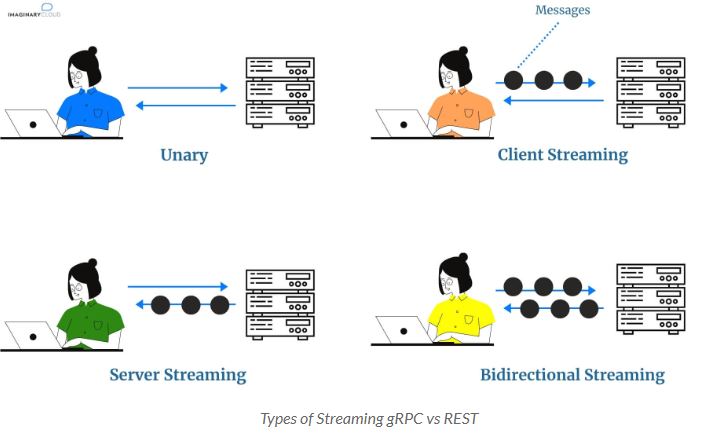
| Features | gRPC | REST |
HTTP 1.1 vs HTTP 2 | Follows a client-response model of communication and is built on HTTP 2, which allows for: streaming communication and bidirectional support. | Follows a request-response model of communication and is typically built on HTTP 1.1. |
Browser Support | Limited browser support. gRPC requires gRPC-web and a proxy layer to perform conversions between HTTP 1.1 and HTTP 2. | Universal browser support. |
Payload Data Structure | gRPC uses Protocol Buffer by default to serialize payload data. | REST mainly relies on JSON or XML formats to send and receive data. |
Code Generation Features | gRPC has native code generation features. | Developers must use a third-party tool like Swagger or Postman to produce code for API requests. |
Saturday, 20 August 2022
Comparing gRPC and REST: A Comparative Analysis
Friday, 12 August 2022
Five Hidden GitHub features that will make it much easier to contribute to open source
1. Whitespace
Adding ?w=1 to a git diff URL will hide all changes in the whitespace, enabling you to see only the code that has changed.Tuesday, 26 April 2022
Optimizing Redis: Best Practices for Enhanced Performance and Tuning
TCP-KeepAlive
Keepalive is a method to allow the same TCP connection for HTTP conversation instead of opening a new one with each new request.
In simple words, if the keepalive is off the Redis will open a new connection for every request which will slow down its performance. If the keepalive is on then Redis will use the same TCP connection for requests.
Let’s see the graph for more details. The Red Bar shows the output when keepalive is on and Blue Bar shows the output when keepalive is off
For enabling the TCP keepalive, Edit the redis configuration and update this value.
vim /etc/redis/redis.conf# Update the value to 0
tcp-keepalive 0
Pipelining
This feature could be your lifesaver in terms of Redis Performance. Pipelining facilitates a client to send multiple requests to the server without waiting for the replies at all and finally reads the reply in a single step.
For example:-

You can also see in the graph as well.
Pipelining will increase the performance of redis drastically.
Max-Connection
Max-connection is the parameter in which is used to define the maximum connection limit to the Redis Server. You can set that value accordingly (Considering your server specification) with the following steps.
sudo vim /etc/rc.local
# make sure this line is just before of exit 0.
sysctl -w net.core.somaxconn=65365This step requires the reboot if you don’t want to reboot the server execute the same sysctl command on the terminal itself.
Overcommit Memory
Overcommit memory is a kernel parameter which checks if the memory is available or not. If the overcommit memory value is 0 then there is a chance that your Redis will get OOM (Out of Memory) error. So do me a favor and change its value to 1 by using the following steps
echo 'vm.overcommit_memory = 1' >> /etc/sysctl.confRDB Persistence and Append Only File
RDB persistence and Append Only File options are used to persist data on disk. If you are using the cluster mode of Redis then the RDB persistence and AOF is not required. So simply comment out these lines in redis.conf
sudo vim /etc/redis/redis.conf
# Comment out these lines
save 900 1
save 300 10
save 60 10000
rdbcompression no
rdbchecksum no
appendonly noTransparent Huge Page(THP)
Most of the people are not aware of this term. Basically, For making the translation of physical and virtual memory kernel uses the concept of paging. This feature was defined to enhance the memory mapping process but somehow it slows down the databases which are memory-based (for example — in the case of Redis). To overcome this issue you can disable THP.
sudo vim /etc/rc.local
# Add this line before exit 0
echo never > /sys/kernel/mm/transparent_hugepage/enabledAs graph also shows the difference in performance. The Red Bar is showing THP disabled performance and Blue Bar is showing THP enabled performance.
Comparing GraphQL and REST API: Unveiling the Differences
- /post/{id} to retrieve a post by id which will return details of a blog post like id, title, content and id of author
- /comment/{id} to retrieve a particular comment by id
- /author/{id} to retrieve an author by id which will return details of an author like id, name, and its email
- /posts to retrieve all posts
1. Single Endpoint vs Multiple Endpoints
Tuesday, 5 April 2022
Reconfiguring Elasticsearch Clusters: A Guide to Cluster Configuration
Elastic Search Cluster:
Elasticsearch cluster is a group of nodes that have the same cluster.name attribute. As nodes join or leave a cluster, the cluster automatically reorganizes itself to evenly distribute the data across the available nodes.
If you are running a single instance of Elasticsearch, you have a cluster of one node.
Types of nodes in Elastic Search:
- Master Nodes: Control of the cluster requires a minimum of 3 with one active at any given time.
- Data Nodes: Holds indexed data and performs data related operations Differentiated Hot and Warm Data nodes can be used -> More below.
- Ingest Nodes: Use ingest pipelines to transform and enrich data before indexing.
You define a node’s roles by setting node.roles in elasticsearch.yml. If you set node.roles, the node is only assigned the roles you specify. For Example:
To create a dedicated master-eligible node, set:
node.roles: [ master ]
To create a dedicated data node, set:
node.roles: [ data ]
To create a dedicated ingest node, set:
node.roles: [ ingest ]
Minimum of Master Nodes:
Master nodes are the most critical nodes in your cluster. In order to calculate how many master nodes you need in your production cluster, here is a simple formula:
N / 2 + 1
Where N is the total number of “master-eligible” nodes in your cluster, you need to round that number down to the nearest integer. There is a particular case; however, if your usage is shallow and only requires one node, then the query is 1. However, for any other use, you need at least a minimum of 3 master nodes in order to avoid any split-brain situation. This is a terrible situation to be in; it can result in an unhealthy cluster with many issues.
This setting should always be configured to a quorum (majority) of your master-eligible nodes. A quorum is (number of master-eligible nodes / 2) + 1. Here are some examples:
➔If you have three dedicated master nodes and a hundred data nodes, the quorum is 2.
➔If you have two regular nodes, you are in a conundrum. A quorum would be 2, but this means a loss of one node will make your cluster inoperable. A setting of 1 will allow your cluster to function but doesn’t protect against the split-brain. It is best to have a minimum of three nodes.
Sharding Impact on Performance:
- What is a shard?
Each shard is a separate Lucene index, made of little segments of files located on your disk. Whenever you write, a new segment will be created. When a certain amount of segments is reached, they are all merged.
- How many shards to use?
If you have a write-heavy indexing case with just one node, the optimal number of indices and shards is 1. However, for search cases, you should set the number of shards to the number of CPUs available. In this way, searching can be multithreaded, resulting in better search performance.
Conclusion:
A resilient cluster requires redundancy for every required cluster component. This means a resilient cluster must have:
- At least three master-eligible nodes
- At least two nodes of each role
- At least two copies of each shard (one primary and one or more replicas, unless the index is a searchable snapshot index)
A resilient cluster needs three master-eligible nodes so that if one of them fails then the remaining two still form a majority and can hold a successful election.
Similarly, the redundancy of nodes of each role means that if a node for a particular role fails, another node can take on its responsibilities.
Finally, a resilient cluster should have at least two copies of each shard. If one copy fails then there should be another good copy to take over. Elasticsearch automatically rebuilds any failed shard copies on the remaining nodes in order to restore the cluster to full health after a failure.
Failures temporarily reduce the total capacity of your cluster. In addition, after a failure, the cluster must perform additional background activities to restore itself to health. You should make sure that your cluster has the capacity to handle your workload even if some nodes fail.
Saturday, 2 April 2022
Deciding Between Kafka and RabbitMQ: A Guide to Choosing the Right Messaging System
Introduction
Kafka and RabbitMQ – These two terms are frequently thrown around in tech meetings discussing distributed architecture. I have been part of a series of such meetings where we discussed their pros and cons, and whether they fit our needs or not. Here’s me documenting my findings for others and my future self.
Message Routing
With respect to message routing capabilities, Kafka is very light. Producers produce messages to topics. Topics can further have partitions (like sharding). Kafka logs the messages in its very simple data structure which resembles… a log! It can scale as much as the disk can.
Consumers connect to these partitions to read the messages. Kafka uses a pull-based approach, so the onus of fetching messages and tracking offsets of read messages lies on consumers.
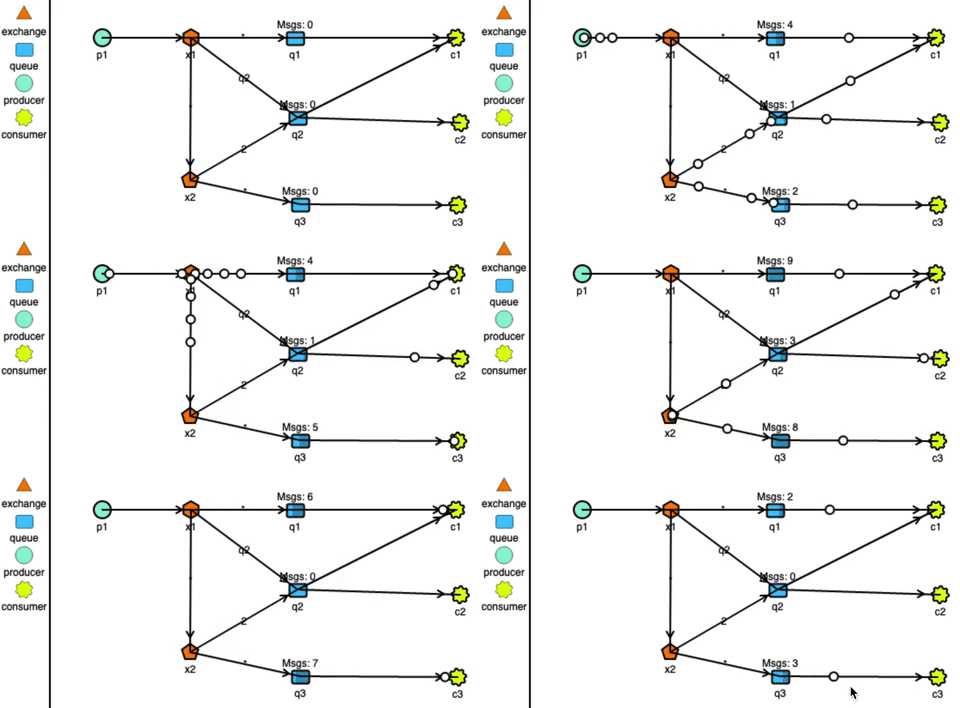
RabbitMQ has very strong routing capabilities. It can route the messages through a complex system of exchanges and queues. Producers send messages to exchanges which act according to their configurations. For example, they can broadcast the message to every queue connected with them, or deliver the message to some selected queues, or even expire the messages if not read in a stipulated time.
Exchanges can also pass messages to other exchanges, making a wide variety of permutations possible. Consumers can listen to messages in a queue or a pattern of queues. Unlike Kafka, RabbitMQ pushes the messages to the consumers, so the consumers don’t need to keep track of what they have read.
Delivery Guarantee
Distributed systems can have 3 delivery semantics:
at-most-once delivery
In case of failure in message delivery, no retry is done which means data loss can happen, but data duplication can not. This isn’t the most used semantic due to obvious reasons.
at-least-once delivery
In case of failure in message delivery, retries are done untill delivery is successfully acknowledged. This ensures no data is lost but this can result in duplicated delivery.
exactly-once delivery
Messages are ensured to be delivered exactly once. This is the most desirable delivery semantic and almost impossible to achieve in a distributed enviornment.
Both Kafka and RabbitMQ offer at-most-once and at-least-once delivery guarantees.
Kafka provides exactly-once delivery between producer to the broker using idempotent producers (enable.idempotence=true). Exactly-once message delivery to the consumers is more complex. It is achieved at consumers end by using transactions API and only reading messages belonging to committed transactions (isolation.level=read_committed).
To truly achieve this, consumers would need to avoid non-idempotent processing of messages in case a transaction has to be aborted, which is not always possible. So, Kafka transactions are not very useful in my opinion.
In RabbitMQ, exactly-once delivery is not supported due to the combination of complex routing and the push-based delivery. Generally, it’s recommended to use at-least-once delivery with idempotent consumers.
NOTE: Kafka Streams is an example of truely idempotent system, which it achieves by eliminating non-idempotent operations in a transaction. It, however is out of the scope of this article. I recommend reading “Enabling Exactly-Once in Kafka Streams” by Confluent if you want to dig in it further.
Throughput
Throughput of message queues depends on many variables like message size, number of nodes, replication configuration, delivery guarantees, etc. I will be focussing on the speed of messages produced versus consumed. The two cases which arise are:
- Queue is empty due to messages being consumed as and when they are produced.
- Queue is backed up due to consumers being offline or producers being faster than consumers.
RabbitMQ stores the messages in DRAM for consumption. In the case where consumers are not far behind, the messages are served quickly from the DRAM. Performance takes a hit when a lot of messages are unread and the queue is backed up. In this case, the messages are pushed to disk and reading from it is slower. So, RabbitMQ works faster with empty queues.
Kafka uses sequential disk I/O to read chunks of the log in an orderly fashion. Performance improves further in case fresh messages are being consumed, as the messages are served from the OS page cache without any I/O reads. However, it should be noted that implementing transactions as discussed in last section will have negative effect on the throughput.
Overall, Kafka can process millions of messages in a second and is faster than RabbitMQ. Whereas, RabbitMQ can process upwards of 20k messages per second.
Persistence
Persistence of messages is another front where both of these tools can not be more different.
Kafka is designed with persistent (or retention as they call it) in mind. A Kafka system can be configured to retain messages – both delivered and undelivered, by configuring either log.retention.hours or log.retention.bytes.
Retaining messages doesn’t effect the performance of Kafka. The consumers can replay retained messages by changing the offset of messages they have read.
RabbitMQ on the other hand, works very differently. Messages when delivered to multiple queues, are duplicated in these queues. These copies are then governed independently of each other by the policy of the queues they are in, and the exchanges they are passing. So to persist the messages in RabbitMQ:
- queues and exchanges need to be made durable,
- messages produced need to be tagged as persistent by the producer
Not to mention, this will have performance impact since disk is involved in an otherwise memory operation.
Conclusion
RabbitMQ offers complex routing use-cases which can not be realized with Kafka’s simple architecture. However, Kafka provides higher throughput and persistence of messages.
Efficient Redis Cache Invalidation Using Async Events
Caching is an integral part of improving application performance, but ensuring cache consistency can be a challenge. I recently designed a R...
-
Caching is an integral part of improving application performance, but ensuring cache consistency can be a challenge. I recently designed a R...
-
Introduction In recent years, we have witnessed remarkable advancements in the field of artificial intelligence (AI). One of the most intrig...
-
Introduction Kafka and RabbitMQ – These two terms are frequently thrown around in tech meetings discussing distributed architecture. I have...